Intro
FIRERPA is an all-in-one device control platform for Android. The server runs directly on the device with no additional runtime dependencies; it supports multiple generations of Android and works with or without root. The PC side orchestrates devices through a Python client library, bringing UI automation, remote operations, traffic interception, hook-based reverse engineering, network proxying, distributed networking, AI Agent / MCP, and other capabilities together into one service and API. Compared with piecing together Appium, mitmproxy, frida-server, adb, uiautomator2, custom scripts, and various operations tools, FIRERPA's advantage lies in unified capability origin, unified configuration, connected chains, and suitability for long-running multi-device and engineering-oriented management.
Hint
This document introduces FIRERPA's platform positioning and core capabilities. For installation and getting started, continue to the Quick Start chapter.
Remote Desktop and Real-Time Screen Casting
FIRERPA provides a browser-based remote desktop, allowing real-time viewing and operation of the device screen without installing a dedicated client on the PC, and supports both LAN and cross-network access. The casting pipeline supports both MJPEG and H.264 encoding, with software and hardware encoder backends. Frame rate (up to 60 fps), resolution scaling, bitrate, and quality can be adjusted according to device compute and network conditions, significantly reducing bandwidth usage and improving smoothness in weak network environments. It further supports WebRTC transport and can be configured with STUN/TURN servers to improve NAT traversal and end-to-end latency, making it suitable for public-network and cross-region remote debugging scenarios.
Remote desktop supports multi-user simultaneous access, facilitating collaborative troubleshooting, demonstrations, and training. It supports bidirectional clipboard sharing and real-time audio streaming (Android 10+), and integrates operations capabilities such as terminal access, drag-and-drop file upload, and directory browsing/download in the same web interface, so daily operations can be completed through a single port. Built-in visual layout inspection includes element highlighting, Tab-key traversal, coordinate and RGB display, and XML layout tree export, allowing selectors and automation logic to be verified directly inside the remote desktop and greatly shortening the "look at UI → write script" feedback loop.
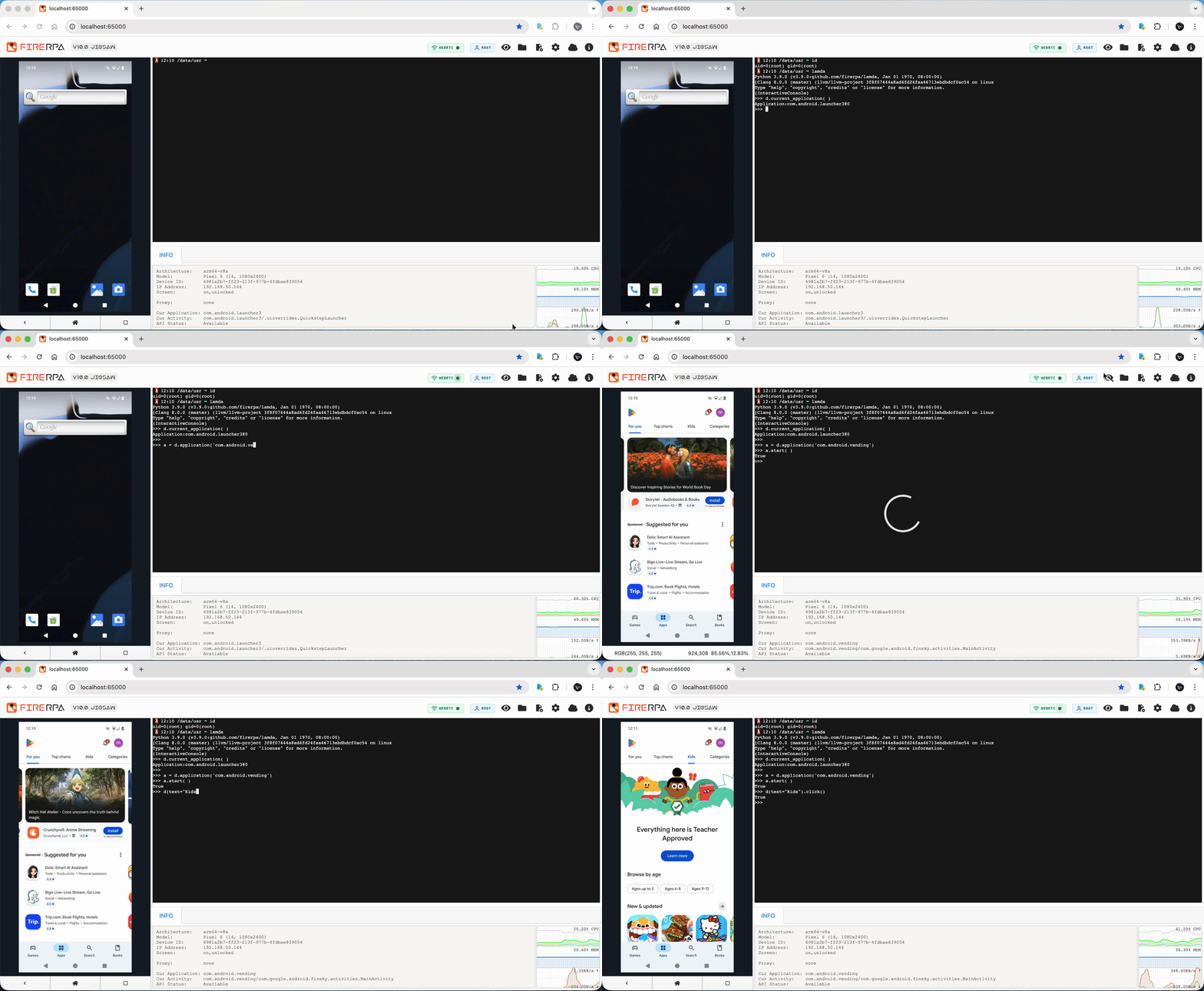
The remote desktop and RPC interfaces support TLS full-chain encryption and service certificate access control, and the WebUI login password can be customized to reduce public-network exposure risk. Remote desktop capabilities can also be embedded into your own web applications through WebSocket (real-time video, touch, terminal, key events, etc.), with cross-origin integration configurable through allow_origin, making it suitable for productizing real-device control capabilities.
UI Automation
FIRERPA provides a complete selector automation system, supporting common matching methods such as text, resourceId, description, and scrollable, as well as child / sibling chain positioning for dealing with duplicate elements, complex hierarchies, or controls without distinctive characteristics. At the element level, it supports fine-grained operations such as screenshots, waiting for appearance/disappearance, corner/center coordinate retrieval, and exists checks, and supports Unicode input, step swiping, fling for fast page scrolling, scrolling to the bottom, and other interactions. It can coexist with other accessibility services on Android 8.0+ and enhances WebView node discovery, improving automation success rates for hybrid applications.
UI Watcher can monitor UI changes in real time and automatically execute clicks, key presses, or counting when preset conditions are met. It is suitable for automatically skipping interfering flows such as agreement popups, update prompts, and ad pages. It supports combining multiple selector conditions and independently starting/stopping events, and can count occurrences of transient screens.
Virtual Display is one of FIRERPA's differentiated capabilities: it can create an independent background display on the device, run apps and automation scripts in the virtual screen, and not affect normal use of the main screen. For example, the virtual screen can automatically process messages in the background while the main screen continues playing videos or being used manually. The Virtual Display API is highly consistent with the main device API; existing d.xxx scripts can be smoothly switched to vd.xxx. Watchers can also be restricted to the virtual screen. The WebUI supports multi-screen display and switching, allowing you to operate or view different displays in the remote desktop, which is suitable for background keep-alive, parallel tasks, and "foreground human + background machine" hybrid scenarios.
For scenarios without a standard View tree, such as games or custom-drawn UIs, FIRERPA provides OCR and image matching capabilities. OCR supports paddleocr, easyocr, and custom HTTP backends. In cluster scenarios, recognition compute can be centralized on the server to avoid repeatedly loading models on each PC, with GPU acceleration and multiple text matching modes. Image matching is executed on the device side using template matching or SIFT, without consuming PC resources; SIFT is more robust to rotation, scaling, and lighting changes. In addition, multi-touch capability supports trajectory recording, playback, code construction, and binary persistence, enabling complex gestures and pressure values.
Architecturally, FIRERPA uses a client/server (C/S) model. Compared with "scripts run directly on the device" approaches such as AutoJS, it is more conducive to centralized scheduling, version management, and cluster control; compared with Appium, it is lighter; compared with uiautomator2, it is more stable in multi-device scenarios. FIRERPA is positioned as a functional superset of common Android automation solutions — automation, packet capture, Hook, and operations can be connected through code on the same platform rather than switching between multiple tools.
Packet Capture and MITM
FIRERPA provides one-click MITM packet capture: it automatically installs a system-level root certificate, configures the proxy, handles Android version differences, and automatically restores the device network state on exit, eliminating the need to manually install certificates or switch proxies. It supports global capture, per-package capture, real-time packet modification, a shared mitmweb interface, and upstream HTTP proxying to capture international traffic through a specified link. Built-in QUIC downgrade processing reduces the impact of QUIC on packet capture. Even when the PC and device can communicate only through a single FIRERPA port, such as via ADB connect or frp forwarding, packet capture can still be performed, adapting to demanding network topologies.
In addition to one-click scripts, MITM-related capabilities are fully API-accessible: system-level root certificate installation/uninstallation works with certificate formats from mitmproxy, Fiddler, Charles, and others, and packet capture flows can be embedded into automation pipelines and completed in the same task as UI operations and Frida Hooks. A Python-free startmitm.exe is provided for Windows, lowering the environment barrier.
Networking, Proxy, and Mesh Networking
FIRERPA provides complete proxy capabilities on the device side, supporting HTTP / HTTPS / SOCKS5 / Shadowsocks with multiple encryption algorithms. It supports per-app proxying, including app clones/multi-user granularity, DNS proxying, UDP proxying, LAN bypass, coexistence with OpenVPN, and automatic connection to preset proxies when the service starts. Proxy support includes IPv6 and UDP, adapting to more complex network environments.
Device HTTP bridge proxy (tunnel2) provides reverse proxy capability: after pointing the PC or browser HTTP proxy to the phone, traffic exits through the phone's network interface, with the external IP matching the phone. Wi-Fi or 4G (rmnet) can be selected as the outbound interface, making it suitable for debugging, international business, multi-device IP pools, and similar scenarios.
Built-in OpenVPN client supports multiple authentication modes, including certificates, username/password, and hybrid authentication, and can coexist with the system proxy. Matching OpenVPN Docker images and configuration generation scripts are provided to automatically generate device-side connection code and autostart configuration, reducing the chance of errors from hand-writing OpenVPN configurations. A built-in frp client can forward device services to a public server through fwd.* configuration, supporting encryption and TLS.
It provides mDNS service discovery: once enabled, services such as the remote desktop can be accessed through the {device_id}.local domain, with optional TXT metadata such as model, ABI, device ID, and more, facilitating batch discovery and management of devices within the LAN.
Frida and Reverse Engineering
FIRERPA has the latest version of Frida built in, so there is no need to deploy frida-server separately. Frida-related commands can be used directly in the remote desktop terminal without cumbersome parameters such as -U or -H. The built-in Frida integrates open-source hiding patches and self-developed hiding capabilities and is continuously iterated to counter detection. Connections use token authentication and are securely accessed through the FIRERPA port. An objection patch and Frida 17.x java-bridge wrapper are provided to reduce migration costs caused by upstream changes.
It supports Frida script persistence: after an app crashes or exits, scripts can be automatically re-injected. It supports YAML offline persistence, directory monitoring, and hot reloading. Frida RPC can be mapped to Python methods and supports HTTP + JSON-RPC 2.0 remote invocation, with execution in JVM threads, the UI main thread, or pure JS context. Data emitted from scripts can be reported to HTTP / Redis / RabbitMQ (MQTT), with device and app metadata, zlib compression, HTTP retry, and MQTT TLS.
ADB, SSH, and Built-in Terminal
FIRERPA provides a built-in ADB service independent of the system ADB, enabling wireless high-permission ADB connections without enabling the system developer mode, which helps avoid "developer options" style detection. The Magisk module can preset adb_keys for default authorization. A built-in SSH service and ssh.sh / scp.sh utility scripts are provided for remote shell access and file transfer.
The built-in terminal comes preinstalled with common analysis tools such as strace, ltrace, tcpdump, scapy, fsmon, frida-tools, and MemDumper, and integrates Python ecosystem components such as Crypto, cv2, unicorn, capstone, keystone, redis, and grpc. sqlite3 supports wxsqlite / sqlcipher / sqlcrypto, providing a path for reading encrypted databases used by WeChat, WeCom, Alibaba-affiliated apps, and others. The built-in terminal is unified with the remote desktop, SSH, and ADB, allowing analysis and self-control to be completed directly on the device and reducing round trips between PC and device.
Distributed and Multi-Device Management
FIRERPA's Pigeon platform (Pigeon + hub-bridge) provides a centralized multi-device access solution, supporting unified management of local and remote devices as well as P2P access. It is suitable for "device at home, person outside" and multi-machine collaboration scenarios. Hub v3 uses SAPI for unified requests and can connect to local and remote devices simultaneously. In addition to Hub, frp forwarding and OpenVPN networking are supported as self-hosted alternatives, with complete documentation and Docker support.
Starting from version 9.0, it supports P2P Bridge peer-to-peer interconnect and a built-in distributed task system; starting from version 7.50, a networking subscription service is available, so self-hosted frp/OpenVPN is not required. Overall, it is designed for large fleets, long-term online operation, and unattended scenarios such as cloud phone pools, real-device farms, and emulator clusters.
AI / MCP / Agent
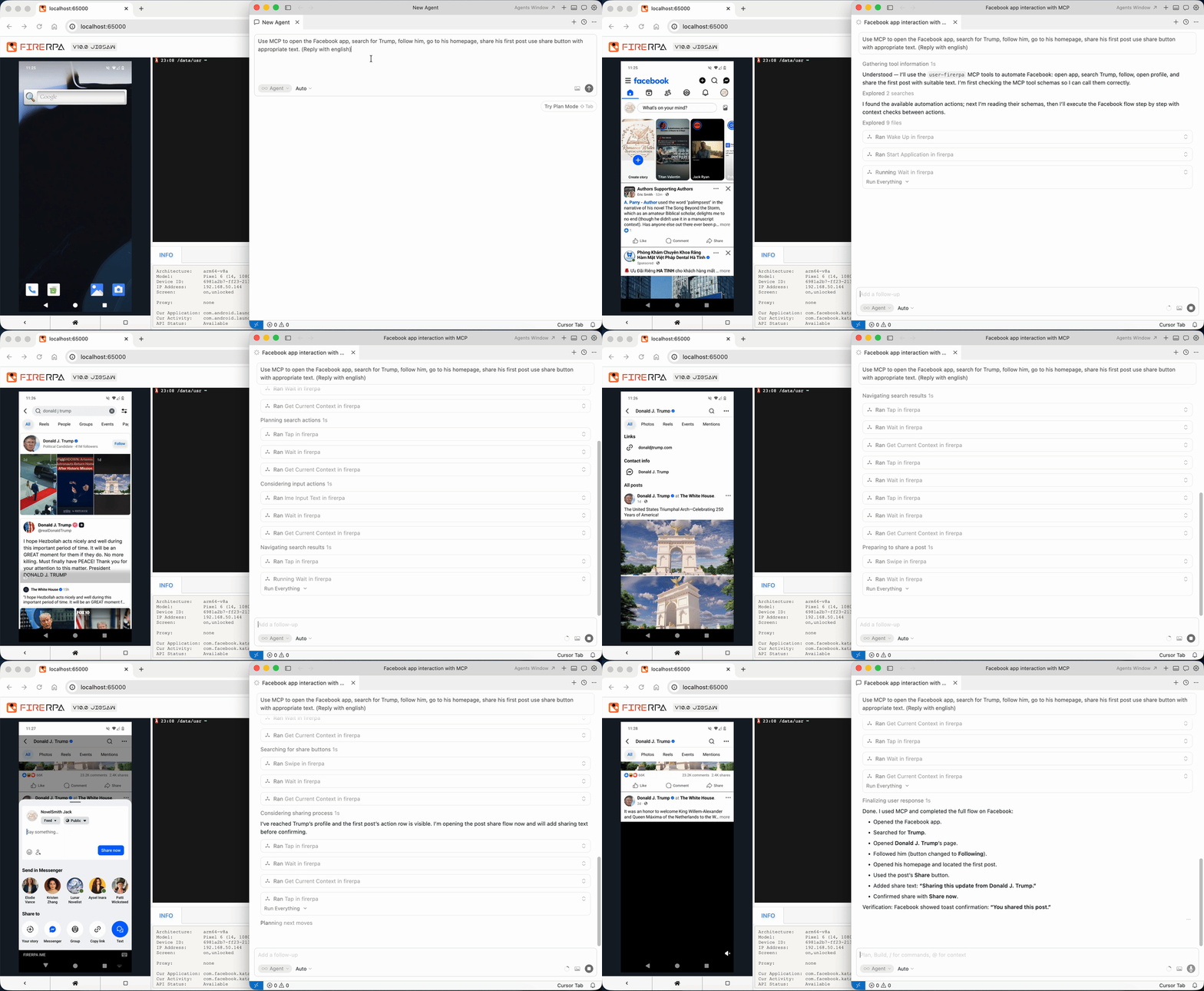
FIRERPA has a built-in MCP server (API path /mcp/) using the streamable-http protocol. It supports tool calls, resource reads, prompts, progress notifications, and logs, and can connect to MCP clients such as Claude and Cursor. Official MCP extension modules are provided, and custom plugins are supported under ~/modules/extension.
The built-in agent command connects to any OpenAI-compatible API with tool calls and drives device operations through natural language, supporting Vision visual mode. It provides an OpenAI semantic task executor. It can be combined with crontab to implement scheduled AI tasks, embedding large model capabilities into real-device automation pipelines.
System-Level Control and Extensions
FIRERPA provides 160+ Python APIs, covering app operations, file I/O, command execution, device state, WiFi, proxy, OpenVPN, shutdown/reboot, service logs, and more. setprop can write ro.* read-only system properties; the Settings API can read and write system settings such as brightness and developer mode. SELinux supports domain creation, permissive mode switching, and fine-grained allow/disallow rules. It supports full API access to app clones, silent granting/revoking of permissions, launching non-exported activities, and disabling apps to save resources.
It provides binary patching capabilities with hex wildcards, glob paths, and dryrun, as well as runtime metric collection for disk, battery, CPU, memory, network I/O, and more. It supports WAV audio playback and internal storage APIs. The device side integrates tflite-runtime, supports invoking hardware compute, and enables on-device inference.
The virtual Debian environment can run a full Debian system and apt inside the device, compile BPF, deploy OpenSSH, and run arbitrary Python dependencies, breaking through the limitation that the built-in terminal cannot use pip/apt.
Deployment, Security, and Governance
FIRERPA supports multiple deployment methods, including one-click APP deployment (Root or Shizuku), Magisk module auto-start on boot, manual extraction, and ROM built-in integration. It is designed for 24/7 resident operation. The APP can automatically generate service certificates; the Magisk zip can preset properties configuration, lamda.pem certificates, and adb_keys. All behavior is centrally managed through an ini-format service configuration: port, WebUI parameters, certificates, OpenVPN, gproxy, frp, tunnel2, cron, sshd, adb, mdns, and more. The WebUI supports visual editing, raw text mode, and hot reload via Reload Service, and can load configuration from a remote file server.
It supports running as both root and shell identities; covers arm64, armeabi-v7a, x86, x86_64, and other architectures; and is compatible with real devices, emulators such as LDPlayer/Nox, Redroid, WSA, AVD, cloud phones, and other environments. Uninstallation is clean and does not scatter junk files throughout the system. The API exclusive lock prevents multiple clients from competing for the same device. The privacy policy explicitly states that it does not collect personal privacy such as contacts, SMS, or geographic location, and it supports offline licensing.
Long-Term Evolution
FIRERPA has been continuously evolving for more than 6 years, including Android 14–16 compatibility fixes. It continues to iterate on multi-user remote desktop, standardized touch APIs, the MCP protocol, Frida versioning and stealth, proxy IPv6/UDP, P2P Bridge, distributed tasks, and more.
FIRERPA's core advantage is not any single feature but the integration of remote desktop (WebRTC/H.264/multi-user), UI automation (including Virtual Display/Watcher/OCR/image matching/multi-touch), one-click packet capture, built-in Frida, full-stack proxy and VPN/frp/P2P networking, ADB/SSH/built-in terminal, AI MCP/Agent, system-level control, virtual Debian, persistent KV, and script encryption into the same Android device, the same service, and the same Python client. This allows security testing, compliance analysis, protocol reconstruction, batch management, and automation workflows to be completed in one pipeline rather than repeatedly splicing together multiple tools.